Optimize Your Apple Watch for Stress Relief
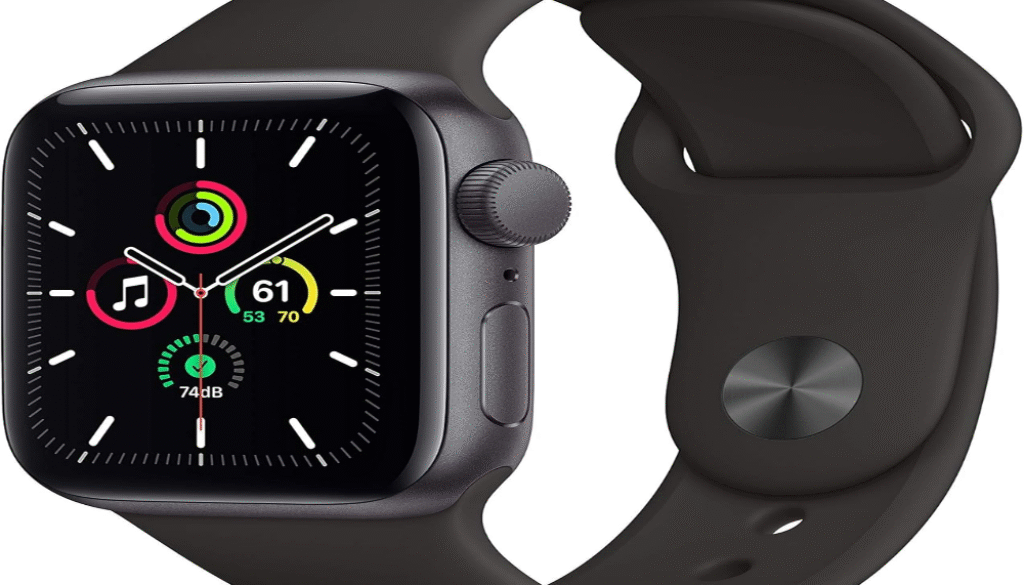
Your Apple Watch contains several built-in features specifically designed to monitor and reduce stress levels throughout your day. The device tracks your heart rate variability, sends breathing reminders, and provides mindfulness prompts that can significantly impact your mental well-being when properly configured.
The key to effective stress management with your Apple Watch lies in customizing its notifications, breathing apps, and activity reminders to match your personal stress patterns and daily routine. Most users never explore beyond the basic settings, missing powerful tools that could transform their stress response.
We’ll walk you through the specific settings adjustments, third-party app integrations, and personalization strategies that turn your Apple Watch into a proactive stress management companion. These techniques are most effective when tailored to your individual lifestyle and stress triggers.
Key Takeaways
- Your Apple Watch has built-in stress monitoring tools that require proper setup to be effective
- Personalizing notifications and breathing reminders creates better stress management results
- Third-party apps can enhance your Apple Watch’s stress relief capabilities beyond the default features
Apple Watch Features That Help With Stress Relief
The Apple Watch includes built-in apps and sensors specifically designed to monitor and reduce stress levels. These features work together to provide real-time feedback about your body’s stress response and guide you through evidence-based relaxation techniques.
Understanding Mindfulness and Breathe Apps
The Breathe app serves as your primary stress relief tool on Apple Watch. It guides you through deep breathing exercises using haptic feedback and visual cues. The app prompts you to take one-minute breathing sessions throughout the day.
We can customize the breathing session length from one to five minutes. The app tracks your heart rate during sessions to measure effectiveness. Visual animations help maintain focus on your breathing rhythm.
The Mindfulness app replaced Breathe in watchOS 8 and later versions. It includes both breathing exercises and reflection sessions. Reflection prompts encourage mindful thinking about emotions, gratitude, or intentions.
Sessions sync automatically with the Health app on your iPhone. This creates a comprehensive record of your mindfulness practice over time. Regular use can lower resting heart rate and improve stress resilience.
Using Heart Rate Monitoring for Stress Detection
Heart rate variability (HRV) measurements provide objective Stress indicators. The Apple Watch tracks HRV overnight while you sleep. Low HRV scores often correlate with higher stress levels or physical strain.
We access HRV data through the Health app under Heart measurements. Trends show how stress affects your body over weeks and months. Sudden drops in HRV may indicate increased life stress or illness.
Elevated heart rate notifications alert you when your heart rate stays high during periods of inactivity. These alerts can identify stress responses before you consciously notice them. The feature works automatically without requiring manual activation.
Heart rate recovery after exercise also indicates stress levels. Slower recovery times often reflect elevated baseline stress. We monitor this metric in the Workout app’s post-exercise summary.
Setting Up Stress Notifications
Mindfulness reminders encourage regular breathing sessions throughout your day. We configure these in the Apple Watch app under Mindfulness settings. Options include four reminders daily at customized times.
The Stand reminders reduce physical stress from prolonged sitting. These notifications appear hourly during your active hours. Moving regularly prevents muscle tension and improves circulation.
Irregular rhythm notifications detect potential atrial fibrillation episodes. Stress can trigger heart rhythm abnormalities in susceptible individuals. This feature requires activation in the Apple Watch app’s Heart settings.
We can enable High heart rate alerts for periods of inactivity. The threshold adjusts automatically based on your fitness level and age. These notifications help identify stress responses during work or challenging situations.
Sleep tracking notifications remind you about bedtime routines. Poor sleep increases stress hormone production the following day. Consistent sleep schedules support better stress management overall.
How to Personalize Apple Watch for Effective Stress Management
Personalizing your Apple Watch settings creates a tailored stress relief experience. The key areas involve setting up mindfulness prompts, adjusting sensory feedback, and organizing your watch interface for instant access to calming features.
Customizing Mindfulness Reminders
We can set up targeted reminders through the Apple Watch’s Breathe app and Mindfulness notifications. Open the Watch app on your iPhone and navigate to Notifications > Mindfulness.
Optimal reminder frequency:
- Light stress: 3-4 reminders daily
- Moderate stress: 5-6 reminders daily
- High stress: Every 2-3 hours
Schedule reminders during your typical stress peaks. Standard trigger times include 9 AM (morning rush), 1 PM (lunch break), and 6 PM (evening transition).
We recommend enabling “Reflect” notifications alongside breathing reminders. These prompt brief mindfulness moments with questions like “What are you grateful for today?”
Set custom Breathe session durations in the Health app. Start with 1-minute sessions and gradually increase to 5 minutes as your practice develops.
Adjusting Haptics and Notifications for Relaxation
Reducing notification interruptions prevents stress spikes throughout your day. We can fine-tune these settings to maintain calm while staying connected.
Essential notification adjustments:
- Turn off email badges and alerts
- Disable social media notifications
- Keep only calls, texts, and calendar alerts active
- Set “Do Not Disturb” during focused work periods
Configure gentler haptic feedback in Settings > Sounds & Haptics. Select “Subtle” haptic strength instead of “Prominent” to reduce jarring vibrations.
Enable Theater Mode during meditation or relaxation sessions. This dims the display and mutes notifications while keeping health tracking active.
We can schedule automatic Do Not Disturb periods for consistent stress reduction. Set quiet hours from 7:00 to 9:00 PM for evening wind-down time.
Organizing Your Watch Face for Quick Access
Strategic watch face customization puts stress relief tools within one tap. We recommend using the Infograph or Modular faces for maximum complication slots.
Priority complications for stress management:
- Breathe app – Center position for instant access
- Heart Rate – Monitor stress responses
- Activity rings – Track movement for stress relief
- Weather – Plan outdoor relaxation activities
Create multiple watch faces for different stress scenarios. Design a “Focus” face with minimal distractions and a “Recovery” face featuring meditation timers and calm apps.
Use the Siri watch face during high-stress periods. It surfaces relevant wellness suggestions based on your routine and calendar.
We can add third-party stress apps like Calm or Headspace as complications. Position these in easily reachable corners for quick meditation access.
Set up the Action button (Series 9 and Ultra) to launch your most-used stress relief app with a single press.
BUY ON AMAZON
Integrating Apple Watch With Third-Party Stress Relief Apps
Third-party apps expand your Apple Watch’s stress management capabilities beyond native features. These apps sync seamlessly with Health app data and offer specialized meditation techniques.
Syncing Meditation and Breathing App Data
Headspace automatically syncs mindfulness sessions to your Apple Watch Health app. The app tracks session duration, heart rate data, and mindfulness minutes for comprehensive wellness monitoring.
Calm integrates with Apple Health to record meditation sessions and sleep stories. Your watch displays progress rings and sends gentle reminders for daily practice sessions.
Insight Timer syncs meditation statistics including:
- Total meditation time
- Session frequency
- Heart rate variability during practice
- Streak counters
Ten Percent Happier connects meditation data with your Activity rings. The app measures stress levels before and after sessions using your watch’s heart rate sensor.
Configure automatic syncing in each app’s settings menu. Navigate to Health permissions and enable data sharing for optimal integration.
Selecting the Best Third-Party Apps for Relaxation
Breathe apps offer guided breathing patterns beyond Apple’s native Breathe feature. Breathwork provides 15+ breathing techniques, including box breathing and 4-7-8 patterns.
Sleep and relaxation apps enhance nighttime routines. AutoSleep monitors sleep quality while Noisli generates ambient sounds directly on your watch.
Mindfulness tracking apps provide detailed analytics. Buddhify offers location-based meditations while Oak focuses on breathing exercises and progressive muscle relaxation.
Consider these factors when selecting apps:
- Battery usage on Apple Watch
- Offline functionality for workouts
- Haptic feedback quality
- Complication support for quick access
Test free versions before purchasing premium subscriptions. Most apps offer 7-14 day trials for full feature access.
BUY HERE
Conclude
Your Apple Watch now functions as a comprehensive stress management tool. The breathing reminders, noise monitoring, and heart rate tracking work together to create awareness of your stress levels.
Key Settings to Remember:
- Breathe app notifications: 4-6 times daily
- Heart rate zones: Customized to your fitness level
- Noise level alerts: 80 decibels or lower
- Stand reminders: Every 50 minutes
The mindfulness apps we configured offer immediate relief when stress levels peak. Your watch will prompt you to take breaks before stress becomes overwhelming.
Sleep tracking improvements help identify stress patterns over time. We can see how daily stress affects our nighttime recovery through the data trends.
Quick Access Features:
- Breathe app on watch face complications
- Heart rate variability in Health app
- Noise exposure weekly summaries
- Activity rings for movement motivation
Your customized control center puts stress relief tools within two taps. The optimized settings reduce unnecessary notifications that add to daily stress.
We’ve transformed your Apple Watch into a proactive wellness companion. The device now anticipates your needs and guides you toward healthier stress responses throughout the day.
Regular review of your stress data helps refine these settings further. Your watch learns your patterns and becomes more effective at supporting your mental wellness over time.